
Random Password Generator-Use our free Random Password Generator to create strong, random passwords with letters, numbers, and special characters. Customize password length and security options.Explore our complete collection of Bra Size Calculator , Grade Calculator,GPA Calculator,URL Encode Decode, Base64 Encode Decode,conversion, and everyday calculators at CalculatorGuides.com to find the right tool for your needs.
🔑 Random Password Generator - CalculatorGuides
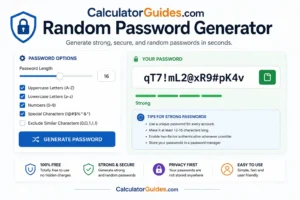
A Random Password Generator creates unpredictable passwords using a combination of letters, numbers, and special characters.
Creating a different password for every account can be difficult, especially when you have many websites and apps to manage. A password generator can create a new password in seconds without requiring you to think of one yourself.
You can usually choose:
- Password length
- Uppercase letters
- Lowercase letters
- Numbers
- Special characters
- Whether similar characters should be excluded
A longer, randomly generated password is generally harder to guess than a short or predictable password.
Security note: For important accounts, use a reputable password generator that uses a cryptographically secure random source when possible. Never reuse an important password across multiple accounts.
What Is a Random Password Generator?
A Random Password Generator is a tool that creates passwords automatically using randomly selected characters.
For example, a generated password might look like:
T7!qL9@vX2#pR8
The exact password should be generated by the tool rather than copied from an example in an article.
A good generator lets you control the password’s:
- Length
- Character types
- Complexity
- Format
Why Use a Random Password Generator?
Manually creating passwords often leads to predictable patterns.
People commonly use:
- Names
- Birthdays
- Phone numbers
- Favorite words
- Common phrases
- Repeated passwords
- Simple number sequences
These patterns can make passwords easier to guess.
A random generator avoids many of these predictable choices by selecting characters automatically.
What Makes a Strong Password?
Password strength depends on several factors, especially:
Length
Longer passwords generally provide a much larger number of possible combinations.
Randomness
A truly random password is harder to predict than one based on personal information.
Uniqueness
A password should ideally be used for only one account.
Character Variety
Depending on the website, mixing uppercase letters, lowercase letters, numbers, and symbols can increase the number of possible combinations.
Password Length
Length is one of the most important factors in password security.
For example, a password such as:
Tiger123
is short and predictable.
A randomly generated password such as:
vR7!kP2@xQ9#Lm4
is considerably harder to guess.
For many accounts, using a password of 16 characters or more is a practical choice when the website allows it.
For highly sensitive accounts, follow the site’s password requirements and use a password manager where appropriate.
Random Password Examples
These are examples of the type of output a generator can produce:
gT8#vQ2!mZ7@Lp4
N4$xK9!rW2#bY6
qP7@L3!vX8#tM5
Do not use these example passwords for real accounts. They are shown only to explain the format.
How Does a Password Generator Work?
A password generator selects characters from a defined character set.
For example, the character set might contain:
- 26 lowercase letters
- 26 uppercase letters
- 10 numbers
- Special characters
If the generator chooses randomly from the available characters, each position can have multiple possible values.
The number of possible passwords grows rapidly as the password becomes longer.
Password Generator Character Options
A customizable generator may include four main character groups.
Lowercase Letters
Examples:
a b c d e
Uppercase Letters
Examples:
A B C D E
Numbers
Examples:
0 1 2 3 4
Special Characters
Examples:
! @ # $ % & *
The available symbols depend on the generator and the requirements of the website where the password will be used.
Password Generator With Symbols
Adding symbols can increase the number of possible combinations.
For example:
K8m4Q2r7
uses letters and numbers.
A password such as:
K8!m4@Q2#r7
also includes symbols.
However, length and unpredictability are more important than simply adding a symbol to an otherwise predictable password.
Password Generator Without Symbols
Some websites do not allow certain special characters.
In that case, you can generate a password using:
- Uppercase letters
- Lowercase letters
- Numbers
For example:
pR8kL3vX7mQ2
The password can still be strong if it is sufficiently long and randomly generated.
Password Generator With Numbers
Numbers add additional possibilities to the password.
For example:
vKpRzLmQ
contains only letters.
A generated password such as:
vK7pR3zL9mQ2
contains letters and numbers.
Avoid predictable number patterns such as:
123456
or adding a birth year to an otherwise common word.
Exclude Similar Characters
Some generators provide an option to exclude characters that can be confused visually.
Examples include:
0andO1andlIandl
This can make passwords easier to read or type manually.
It may slightly reduce the available character set, but readability can be useful for certain situations.
Password Generator for Wi-Fi
A random password generator can create a strong Wi-Fi password.
For example, instead of:
MyWifi123
you could use a longer randomly generated password.
Before using it, check your router’s password requirements because some devices may restrict certain characters or maximum lengths.
Password Generator for Email
Your email account can be particularly important because it may be used to reset passwords for other accounts.
Use a unique, strong password for your email account and enable multi-factor authentication (MFA) when available.
A password generator can help create the unique password.
Password Generator for Social Media
Use a separate password for each social media account.
For example:
- Instagram → unique password
- Facebook → unique password
- X → unique password
- LinkedIn → unique password
If one password is exposed, reusing it elsewhere can put multiple accounts at risk.
Password Generator for Online Banking
Financial accounts deserve particularly strong protection.
Use:
- A unique password
- A long password
- Multi-factor authentication when available
- A trusted password manager if appropriate
Never use a password example from an article as your actual banking password.
Password Generator for Gaming Accounts
Gaming accounts can also contain valuable personal information, purchases, or payment details.
Use a different password for each gaming platform or account.
A password generator can create random passwords without requiring you to invent one manually.
Random Password vs Memorable Password
There are two useful approaches.
Random Password
Example:
vQ7!mL2#xR9@pK4
Best suited for storing in a password manager.
Random Passphrase
Example:
river-lamp-orbit-cactus-72
A randomly generated passphrase can be easier for a person to remember while still providing substantial length.
The important factor is that the words should be selected randomly rather than forming a predictable sentence.
Password Generator and Password Managers
A password manager can store your generated passwords so you do not have to memorize every one.
A practical approach is:
- Generate a unique password.
- Save it in your password manager.
- Use it only for that account.
- Enable MFA where available.
This allows you to use long, unique passwords without needing to remember them all.
Password Entropy
Password entropy is a way of describing the uncertainty or number of possible choices involved in a password.
If a password is generated randomly from a character set of size N and has length L, the idealized entropy is:
Entropy = L × log₂(N)
For example, if each character is randomly selected from 62 possible letters and numbers, a 16-character password has an idealized entropy of:
16 × log₂(62)
≈ 95 bits
This assumes the characters were actually selected randomly.
A human-created password with the same length may have much less effective entropy if it follows predictable patterns.
Why Randomness Matters
Consider these two passwords:
Summer2026!
and
q8#Lz2@Vm7!Rp4
The first contains recognizable information and a predictable structure.
The second is much less predictable.
A password generator is useful because it removes much of the human tendency to choose familiar patterns.
How to Use the Random Password Generator
Step 1: Choose Password Length
Select the number of characters you want.
Step 2: Choose Character Types
You can typically enable:
- Uppercase
- Lowercase
- Numbers
- Symbols
Step 3: Exclude Characters if Needed
Remove characters that a particular website does not accept.
Step 4: Generate
Create a new random password.
Step 5: Save It Securely
Store the password in a password manager or another secure location.
Avoid saving sensitive passwords in plain text files or public notes.
How Long Should a Password Be?
There is no single length that is perfect for every situation.
A practical approach is to choose the longest length accepted by the service, provided the password can be stored and used reliably.
For many personal accounts, 16 or more randomly generated characters is a strong starting point.
Passphrases can also provide substantial security when they are sufficiently long and randomly generated.
Is a 12-Character Password Strong?
A random 12-character password can be quite strong, depending on the character set and how it was generated.
However, a 12-character password based on a predictable phrase or personal information is very different from a truly random 12-character password.
When allowed, longer passwords generally provide more security.
Is a 16-Character Password Strong?
A randomly generated 16-character password can provide a very large search space.
It is especially practical when stored in a password manager.
The actual security still depends on the randomness of the generation process and the security of the account itself.
Password Generator and Account Security
A strong password is only one part of account security.
Also consider:
- Multi-factor authentication
- Security alerts
- Recovery methods
- Updated software
- Device security
- Phishing awareness
- Password-manager protection
A strong password cannot protect an account if you voluntarily give it to a fake website or attacker.
Random Password Generator for Developers
Developers may need random strings for testing, temporary identifiers, or other non-security purposes.
For security-sensitive uses such as:
- Authentication tokens
- Session identifiers
- Password reset tokens
- API secrets
use a cryptographically secure random number generator rather than a basic pseudo-random function.
Cryptographically Secure Password Generation
A security-focused password generator should use a source of randomness designed for cryptographic applications.
This is important because ordinary random functions may be predictable under certain conditions.
For real account passwords, use a reputable password manager or generator designed for security.
What Not to Put in a Password
Avoid using:
- Your name
- Birthday
- Phone number
- Address
- Pet’s name
- Family member’s name
- Favorite team
- Common words
- Sequential numbers
- Repeated characters
- Passwords used elsewhere
Personal information can be easier to discover or guess than randomly generated data.
Common Password Mistakes
Reusing the Same Password
If one service is compromised, reused passwords can put other accounts at risk.
Making Small Changes
Changing:
Password123
to:
Password124
does not create a genuinely independent strong password.
Using Personal Information
Names and birthdays can be easier to guess.
Using Short Passwords
Short passwords have fewer possible combinations.
Sharing Passwords
Do not share passwords through insecure messages or public channels.
Storing Passwords Insecurely
Avoid keeping sensitive passwords in easily accessible plain-text documents.
Random Password Generator vs Password Strength Checker
These tools serve different purposes.
Password Generator
Creates a new password.
Password Strength Checker
Estimates how resistant an existing password may be to guessing or common attacks.
A password generator is generally preferable to trying to manually improve a weak password.
Frequently Asked Questions
What is a Random Password Generator?
It is a tool that creates passwords automatically using randomly selected characters.
What makes a password strong?
Length, randomness, and uniqueness are major factors.
How long should my password be?
Use a long password accepted by the service. For many accounts, 16 or more randomly generated characters is a practical choice.
Should I use special characters?
They can increase the number of possible combinations, but password length and randomness are also very important.
Should every account have a different password?
Yes. Unique passwords reduce the damage if one account’s password is exposed.
Is a random password better than a name and birthday?
Generally, yes. Random passwords avoid predictable personal information.
Can I use the generated password for banking?
A strong unique password can be appropriate for banking, but use it with the bank’s other security features, especially MFA where available.
Can I use a generated password for Wi-Fi?
Yes, provided the router accepts the selected characters and length.
Is a 16-character password secure?
A truly random 16-character password can be very strong, although no password provides absolute protection.
Is a password generator safe?
The security depends on how it generates and handles passwords. For sensitive accounts, use a reputable generator that uses cryptographically secure randomness and does not expose or store generated passwords unnecessarily.
Does the generator store my password?
A properly designed client-side generator can generate the password locally without sending it to a server. Check the tool’s privacy and technical details before using it for sensitive accounts.
Is Base64 a good way to make a password?
No. Base64 is an encoding method, not a password-strengthening or encryption method.
Should I memorize my generated passwords?
You generally do not need to memorize every unique password if you use a reputable password manager.
What is a passphrase?
A passphrase is a password made from multiple words. A sufficiently long, randomly generated passphrase can be easier to remember while providing strong security.
Is the Random Password Generator free?
Yes. The CalculatorGuides.com Random Password Generator is free to use.
Random Password Generator – Important Security Tips
For better account security:
- Use a unique password for every important account.
- Prefer long passwords.
- Generate passwords randomly.
- Use a reputable password manager.
- Enable MFA whenever possible.
- Never share passwords publicly.
- Do not use passwords from online examples.
- Avoid personal information.
- Replace compromised passwords immediately.
- Check that the website supports your chosen password length and characters.
Conclusion
A Random Password Generator makes it easy to create long, unique, and unpredictable passwords without manually inventing them.
The most important characteristics of a strong password are length, randomness, and uniqueness. A different password for every account helps prevent one compromised password from exposing multiple accounts.
For important accounts, consider using a reputable password manager and enabling multi-factor authentication. A password generator should also use a cryptographically secure source of randomness when generating passwords intended for real security.
Remember that Base64, hashing, or simple character substitutions do not make a weak password secure.
Use the CalculatorGuides.com Random Password Generator to create a customized password with the length and character types you need.