
URL Encode Decode-Use our free URL Encoder and Decoder to safely encode or decode URLs, query parameters, special characters, spaces, and other URL data.A URL Encode Decode tool helps you encode or decode text used inside URLs.Explore our complete collection of Bra Size Calculator , Grade Calculator,GPA Calculator,Shoe Size Conversion, Tip Calculator,conversion, and everyday calculators at CalculatorGuides.com to find the right tool for your needs.
🔗 URL Encoder / Decoder - CalculatorGuides
For example:
Hello World
can be URL encoded as:
Hello%20World
The %20 represents a space.
Our free URL Encoder & Decoder can help you:
Encode text for use in URLs
Decode percent-encoded text
Convert spaces and special characters
Work with query parameters
Understand percent encoding
Check encoded URLs
Decode URL parameters
What Is URL Encoding?
URL encoding, also called percent encoding, converts certain characters into a format that can safely be used in a URL.
Some characters have special meanings in URLs. Others may not be suitable for direct use.
For example:
Hello World
becomes:
Hello%20World
The percent sign followed by two hexadecimal digits represents the encoded byte.
What Is URL Decoding?
URL decoding reverses URL encoding.
For example:
Hello%20World
becomes:
Hello World
The decoder converts percent-encoded sequences back into their original representation.
URL Encoding Example
Original text:
Hello World
Encoded:
Hello%20World
Another example:
hello@example.com
may contain characters that need special handling depending on where they appear in a URL.
A URL encoder applies the appropriate percent encoding.
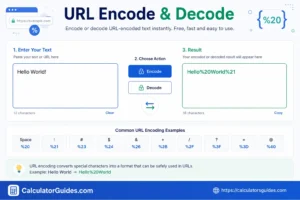
URL Encoding Table
Here are some common URL-encoded characters:
Character Encoded Form
Space %20
! %21
” %22
# %23
$ %24
% %25
& %26
‘ %27
( %28
) %29
+ %2B
, %2C
/ %2F
: %3A
; %3B
= %3D
? %3F
@ %40
The exact treatment of a character can depend on where it appears in a URL and how the URL is being constructed.
How URL Encoding Works
URL percent encoding represents bytes using:
% + two hexadecimal digits
For example:
Space
is represented as:
%20
because the UTF-8 byte for a normal space is hexadecimal 20.
Another example:
/
is:
%2F
because its byte value is hexadecimal 2F.
URL Encode vs URL Decode
Function Purpose
URL Encode Converts text into URL-safe percent-encoded form
URL Decode Converts percent-encoded text back
Input Plain text or URL data
Output Encoded or decoded representation
Example:
Encode:
Hello World
Hello%20World
Decode:
Hello%20World
Hello World
Why Do URLs Need Encoding?
URLs have a defined syntax.
Characters such as:
?
&
=
#
/
can have special meanings.
For example:
https://example.com/search?q=blue shoes
contains a space in the query value.
A URL-encoding process can represent the space safely:
https://example.com/search?q=blue%20shoes
This helps preserve the intended value when the URL is transmitted or processed.
URL Encoding Spaces
Spaces are commonly represented as:
%20
For example:
New York
becomes:
New%20York
In some form-encoding contexts, a space may instead be represented by:
+
So:
New York
can appear as:
New+York
However, + and %20 are not interchangeable in every URL-processing context.
URL Encoding Query Parameters
Query parameters are values added after a ? in a URL.
Example:
https://example.com/search?q=calculator
If the query contains spaces or special characters, those values may need encoding.
For example:
https://example.com/search?q=URL encoder
can become:
https://example.com/search?q=URL%20encoder
The exact encoding should be applied to the parameter value rather than blindly encoding the entire URL.
URL Encoding Special Characters
Special characters can have different meanings depending on their location in a URL.
For example:
&
often separates query parameters.
Consider:
?name=John&city=Delhi
Here, & separates two parameters.
If the actual value contains an ampersand, it may need encoding so it is treated as data rather than as a separator.
URL Encoding Unicode Text
URLs can contain text from many languages.
For example:
Hello
or:
你好
Unicode characters are represented using their UTF-8 bytes and then percent encoded when necessary.This allows international text to be represented in URLs.
URL Encoding Emoji
Emoji are Unicode characters and can also be percent encoded.
For example, an emoji such as:
is represented through its UTF-8 bytes and percent encoding.
A URL decoder can convert the encoded representation back into the original character when the input is valid.
URL Encoding Example With a Query
Suppose you want to search for:
best calculator for students
The query value can be encoded as:
best%20calculator%20for%20students
The URL might then look like:
https://example.com/search?q=best%20calculator%20for%20students
URL Decode Example
Encoded URL text:
Hello%20World%21
Decoded result:
Hello World!
Here:
%20 → space
%21 → !
URL Decode Query Parameters
Suppose a web application receives:
q=best%20online%20calculator
Decoding the parameter gives:
best online calculator
This allows the application to work with the original text value.
URL Encoding and UTF-8
Modern web applications commonly use UTF-8 for representing Unicode text.This is important because a character may require multiple bytes.For example, English letters often use one byte in UTF-8, while many other Unicode characters require multiple bytes.URL percent encoding operates on the encoded bytes.
URL Encode vs Base64
URL encoding and Base64 are different techniques.
URL Encoding
Used to represent characters safely within URLs.
Example:
Hello World
Hello%20World
Base64
Converts binary data into a text representation.
It is not a replacement for URL encoding.
Base64 strings can themselves contain characters that need URL encoding when placed in certain URL components.
URL Encoding vs HTML Encoding
These are also different.
URL Encoding
Used for URL components.
Example:
Hello%20World
HTML Encoding
Used to represent characters safely in HTML.
For example:
&
can be represented as:
&
Do not use HTML encoding as a replacement for URL encoding.
URL Encoding vs JavaScript Encoding
Programming languages provide functions for URL encoding.
In JavaScript, common functions include:
encodeURI()
encodeURIComponent()
decodeURI()
decodeURIComponent()
These functions are not identical.
encodeURIComponent() is commonly used when encoding an individual URL component such as a query parameter value.
When Should You Encode a URL?
URL encoding is especially useful when:
- A query contains spaces
- A parameter contains special characters
- User-generated text is added to a URL
- Unicode text is included
- A URL component contains reserved characters
- Data is passed between web applications
Should You Encode the Entire URL?
Usually, you should not blindly encode an entire URL.
A URL contains different components, and some characters have structural meaning.
For example:
https://example.com/search?q=hello world
You generally want to encode the query value:
hello%20world
rather than converting every character in the complete URL.
URL Encoding for Developers
Developers commonly encounter URL encoding when working with:
- APIs
- Web forms
- Query strings
- Search URLs
- Redirects
- HTTP requests
- Authentication flows
- Web applications
Database-generated links
Correctly encoding individual URL components helps prevent data from being interpreted as URL syntax.
URL Encoding in APIs
APIs frequently use query parameters.
Example:
https://api.example.com/search?q=red shoes
The parameter value should be encoded when necessary:
https://api.example.com/search?q=red%20shoes
This ensures that the space is represented correctly.
URL Encoding and Security
URL encoding is useful for correctly representing data, but it is not a security mechanism by itself.
Encoding does not automatically make untrusted input safe.
Web applications should still use:
Input validation
Proper output encoding
Parameterized database queries
Appropriate authentication
Access controls
Do not rely on URL encoding alone to prevent security vulnerabilities.
URL Encoding and Double Encoding
Double encoding happens when already encoded data is encoded again.
For example:
%20
can become:
%2520
because % itself becomes:
%25
This can cause unexpected results if an application decodes data the wrong number of times.
Always know whether your input has already been encoded.
How to Use the URL Encode Decode Tool
Step 1: Enter Your Text
Paste your text, URL component, or encoded value into the input box.
Step 2: Choose an Action
Select:
Encode
or:
Decode
Step 3: Run the Tool
The tool converts the input automatically.
Step 4: Copy the Result
Use the output wherever you need the encoded or decoded value.
URL Encode Decode Example
Input
https://example.com/search?q=hello world
Encoding the Query Value
https://example.com/search?q=hello%20world
Decoding
hello%20world
becomes:
hello world
Common URL Encoding Mistakes
Encoding the Wrong Part
Do not blindly encode an entire URL when only one parameter needs encoding.
Encoding Data Twice
Double encoding can produce unexpected results.
Confusing + and %20
They can have different meanings depending on the context.
Using HTML Encoding
HTML entities such as & are not the same as URL percent encoding.
Assuming Encoding Provides Security
URL encoding changes representation; it does not validate or sanitize untrusted data.
Ignoring Character Encoding
Unicode text should be handled using the correct character encoding, commonly UTF-8.
Frequently Asked Questions
What is URL encoding?
URL encoding converts characters into a percent-encoded format that can be safely represented in URL components.
What is URL decoding?
URL decoding converts percent-encoded sequences back into their original representation.
What does %20 mean in a URL?
%20 represents a space character in percent encoding.
What does %2F mean?
%2F represents the forward slash /.
What does %3F mean?
%3F represents the question mark ?.
What does %26 mean?
%26 represents the ampersand &.
What does %3D mean?
%3D represents the equals sign =.
Is URL encoding the same as Base64?
No. URL encoding represents characters using percent encoding, while Base64 converts binary or text data into a Base64 representation.
Is URL encoding the same as HTML encoding?
No. URL encoding is intended for URLs and URL components, while HTML encoding is used when representing text safely in HTML.
Should spaces be encoded as %20?
%20 is the percent-encoded representation of a space. In some form-encoding contexts, spaces can instead be represented by +.
Can I encode an entire URL?
You can encode URL data, but blindly encoding the entire URL is often incorrect. Usually, individual URL components should be encoded appropriately.
Can URL encoding handle Unicode?
Yes. Unicode text can be represented through its UTF-8 bytes and percent encoding.
What is double URL encoding?
Double encoding occurs when an already encoded value is encoded again.
For example:
%20
can become:
%2520
Is URL encoding secure?
URL encoding is not a security feature by itself. It only changes how data is represented.
Is the URL Encode Decode tool free?
Yes. The CalculatorGuides.com URL Encode Decode tool is free to use.
URL Encode Decode – Important Things to Remember
- When working with URLs:
- Encode URL components when necessary.
- Use UTF-8 for Unicode data.
- Be careful with reserved characters.
- Do not confuse URL encoding with HTML encoding.
- Do not confuse URL encoding with Base64.
- Avoid accidentally encoding data twice.
- Check whether a value is already encoded before processing it.
- Do not rely on encoding as a security measure.
Conclusion
URL Encode & Decode is a useful tool for converting text and URL components between normal and percent-encoded formats.URL encoding represents certain characters using a % followed by hexadecimal digits. For example, a space can become %20, while URL decoding converts that representation back into the original character.The tool can be useful when working with query parameters, APIs, web applications, search URLs, redirects, and Unicode text.
Remember that URL encoding should normally be applied to the appropriate URL component, not blindly to an entire URL. Also, encoding is not the same as encryption and should never be treated as a security mechanism.Use the CalculatorGuides.com URL Encode Decode tool to quickly encode or decode URL text and check percent-encoded values.