
Tile Calculator-Use our free Tile Calculator to estimate how many tiles you need for a floor, wall, bathroom, kitchen, or other space. Calculate tile quantity, All Online Calculators, area, boxes, cost, and wastage.
🔲 Tile Calculator | CalculatorGuides
Planning a new floor, bathroom, kitchen backsplash, or wall project? A Tile Calculator can help you estimate how many tiles you need before you buy them.
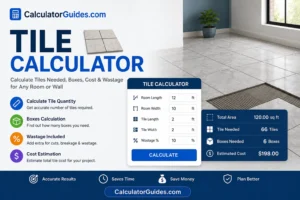
You can enter the length and width of your room, choose the tile size, and calculate the total number of tiles required. You can also allow for tile wastage, check the estimated number of boxes, and work out the approximate tile cost.
This can help you avoid two common problems: buying too few tiles or spending money on far more tiles than you need.
The calculator can be useful for:
- Floor tiles
- Wall tiles
- Bathroom tiles
- Kitchen tiles
- Shower tiles
- Backsplash tiles
- Patio tiles
- Garage floors
- Living room floors
- Bedroom floors
- Outdoor tiles
- Large-format tiles
- Square and rectangular tiles
What Does a Tile Calculator Do?
A tile calculator estimates the amount of tile required to cover a particular area.
It normally uses:
- Room length
- Room width
- Tile length
- Tile width
- Tile wastage percentage
The basic calculation is:
Room Area = Length × Width
Then:
Tiles Needed = Total Area ÷ Tile Area
A little extra tile should normally be purchased to account for cuts, breakage, corners, difficult areas, and future repairs.
How to Calculate How Many Tiles You Need
The easiest method is to calculate the room area first.
Suppose your room is:
12 ft long
and:
10 ft wide
Room area:
12 × 10 = 120 square feet
Now suppose each tile is:
2 ft × 2 ft
Tile area:
2 × 2 = 4 square feet
Tiles required:
120 ÷ 4 = 30 tiles
So you need at least:
30 tiles
before adding extra tiles for wastage.
How Much Extra Tile Should You Buy?
It is usually a good idea to buy extra tiles instead of ordering the exact calculated quantity.
The amount of extra tile depends on the project.
A simple room with straight walls may need less extra material, while a room with many corners, angles, patterns, or complicated cuts may need more.
A common planning range is around:
10% extra for normal wastage
For a more complicated layout, you may need around:
15% or more
The exact amount depends on the tile, room shape, installation pattern, and skill of the installer.
Tile Wastage Calculator
Suppose your calculated requirement is:
100 square feet
and you add:
10% wastage
Extra tile:
100 × 10% = 10 square feet
Total tile to buy:
100 + 10 = 110 square feet
So you would plan for approximately:
110 square feet of tile
Why Is Tile Wastage Important?
Tiles often need to be cut around:
- Walls
- Doors
- Cabinets
- Toilets
- Drains
- Pipes
- Corners
- Columns
- Fixtures
Some tiles may also break during transportation or installation.
Keeping a few extra tiles can also be useful later if a tile becomes cracked or damaged and needs to be replaced.
Tile Calculator for a Floor
To calculate tiles for a rectangular floor:
Floor Area = Length × Width
For example:
15 ft × 12 ft = 180 sq ft
If your tiles cover 2 sq ft each:
180 ÷ 2 = 90 tiles
With 10% extra:
90 × 1.10 = 99 tiles
You would therefore plan for approximately:
99 tiles
If tiles are sold by the box, check how much area one box covers before purchasing.
Tile Calculator for a Wall
The same basic method works for walls.
Calculate:
Wall Area = Wall Length × Wall Height
For example:
10 ft × 8 ft = 80 sq ft
If there are multiple walls, calculate each wall separately and add the areas together.
If there is a door or window, its area can be subtracted if you want a more precise estimate.
Bathroom Tile Calculator
Bathrooms can be slightly harder to calculate because they may have:
- Multiple walls
- Doors
- Windows
- Shower areas
- Niches
- Pipes
- Fixtures
- Different tile layouts
For bathroom walls, calculate each wall separately.
For example:
Wall 1 = 8 × 7 = 56 sq ft
Wall 2 = 6 × 7 = 42 sq ft
Total:
56 + 42 = 98 sq ft
Then subtract areas that will not be tiled if appropriate and add your planned wastage.
Shower Tile Calculator
For a shower wall, calculate:
Wall Width × Wall Height
If there are three shower walls, calculate all three areas.
For example:
- Back wall: 5 × 7 = 35 sq ft
- Side wall: 3 × 7 = 21 sq ft
- Side wall: 3 × 7 = 21 sq ft
Total:
77 sq ft
Then add an appropriate amount of extra tile.
For wet areas, make sure the tile and installation materials are suitable for the application.
Kitchen Backsplash Tile Calculator
A backsplash usually covers a smaller area, but there may be many outlets, corners, cabinets, and other obstacles.
Calculate:
Backsplash Length × Backsplash Height
For example:
12 ft × 1.5 ft = 18 sq ft
With 10% extra:
18 × 1.10 = 19.8 sq ft
You would plan for about:
20 sq ft
of tile, depending on package sizes.
Tile Calculator for Multiple Areas
If you have several rooms or sections, calculate each area separately.
For example:
Living Room
20 × 15 = 300 sq ft
Bedroom
12 × 12 = 144 sq ft
Hallway
10 × 4 = 40 sq ft
Total:
300 + 144 + 40 = 484 sq ft
If you add 10% wastage:
484 × 1.10 = 532.4 sq ft
You would plan to purchase enough tile to cover approximately:
533 sq ft
subject to package sizes and your installation plan.
How to Calculate Tile Area
For a rectangular tile:
Tile Area = Tile Length × Tile Width
Make sure both measurements use the same unit.
For example:
A tile measuring:
12 in × 24 in
has an area of:
288 square inches
To convert to square feet:
288 ÷ 144 = 2 sq ft
So one 12 × 24 inch tile covers:
2 square feet
Tile Size Calculator
Popular tile sizes include:
- 12 × 12 inches
- 12 × 24 inches
- 18 × 18 inches
- 24 × 24 inches
- 6 × 6 inches
- 4 × 4 inches
- 300 × 300 mm
- 300 × 600 mm
- 600 × 600 mm
- 600 × 1200 mm
Tile size affects the number of individual tiles required.
A larger tile can cover more area per piece, but it may create more cutting challenges in small or irregular rooms.
How Many 12×12 Tiles Do I Need?
A 12 × 12 inch tile covers:
1 square foot
Therefore, a:
100 sq ft
area needs approximately:
100 tiles
before adding wastage.
With 10% extra:
100 × 1.10 = 110 tiles
So approximately:
110 tiles
would be needed.
How Many 12×24 Tiles Do I Need?
A 12 × 24 inch tile covers:
2 square feet
For a:
200 sq ft
area:
200 ÷ 2 = 100 tiles
With 10% extra:
100 × 1.10 = 110 tiles
So you would plan for approximately:
110 tiles
How Many 24×24 Tiles Do I Need?
A 24 × 24 inch tile covers:
4 square feet
For a:
400 sq ft
area:
400 ÷ 4 = 100 tiles
With 10% extra:
100 × 1.10 = 110 tiles
Therefore, approximately:
110 tiles
would be needed.
Tile Calculator in Square Feet
Square feet are commonly used for room and flooring calculations.
The formula is:
Area = Length in feet × Width in feet
For example:
20 ft × 10 ft = 200 sq ft
If the area is irregular, divide it into smaller rectangles, calculate each area, and add them together.
Tile Calculator in Square Meters
For metric measurements:
Area = Length in meters × Width in meters
For example:
5 m × 4 m = 20 m²
If a tile measures:
0.5 m × 0.5 m
its area is:
0.25 m²
Tiles required:
20 ÷ 0.25 = 80 tiles
Add extra tiles for cuts and wastage.
Square Feet to Square Meters
A useful conversion is:
1 square foot = 0.092903 square meters
Therefore:
100 sq ft ≈ 9.29 m²
And:
1 m² ≈ 10.764 sq ft
This is useful when your room dimensions and tile packaging use different measurement systems.
Tile Boxes Calculator
Tiles are often sold in boxes rather than individually.
If one box covers:
20 sq ft
and your project requires:
110 sq ft
then:
110 ÷ 20 = 5.5 boxes
Since you cannot normally purchase half a box, you would need:
6 boxes
Always check the manufacturer’s stated coverage because the number of tiles per box can vary.
How Many Tiles Are in a Box?
There is no single answer.
The number of tiles in a box depends on:
- Tile size
- Tile thickness
- Manufacturer
- Product
- Packaging
A box may contain a different number of tiles but still cover a similar total area.
For this reason, coverage per box is usually more useful than simply counting tiles.
Tile Cost Calculator
You can also estimate the material cost.
The basic formula is:
Tile Cost = Tile Area Required × Price Per Square Unit
For example:
Required tile:
500 sq ft
Price:
$3 per sq ft
Estimated tile cost:
500 × $3 = $1,500
This is only the tile material cost.
Other project costs may include:
- Adhesive
- Grout
- Backer board
- Underlayment
- Trim
- Delivery
- Labor
- Removal of old flooring
Tile Installation Cost
The final project cost can be much higher than the tile purchase price.
A complete estimate may include:
Tile Cost + Installation Labor + Materials + Preparation + Other Fees
Labor costs vary by location and project difficulty.
Factors that can increase installation cost include:
- Complex patterns
- Small tiles
- Large-format tiles
- Many cuts
- Uneven surfaces
- Removal of old tile
- Waterproofing
- Difficult access
Tile Calculator With Grout
Grout is normally needed between tiles.
The amount required depends on:
- Tile size
- Tile thickness
- Grout joint width
- Total tiled area
Smaller tiles usually create more grout joints than larger tiles.
For a precise grout estimate, use the grout manufacturer’s coverage information or a dedicated grout calculator.
Tile Calculator With Grout Width
The width of the grout joint can affect the final layout.
For example:
A 12-inch tile installed with a grout joint will not occupy exactly 12 inches of continuous finished space in the same way as a tile installed edge-to-edge.
The actual layout should account for:
- Tile dimensions
- Grout joint
- Room dimensions
- Perimeter cuts
- Expansion or movement requirements where applicable
Tile Layout Patterns
The installation pattern can affect the amount of waste.
Common patterns include:
- Straight lay
- Grid
- Running bond
- Brick pattern
- Herringbone
- Stack bond
- Diagonal layout
A simple straight layout may produce less waste than a more complicated pattern.
Patterns with many angled cuts may require additional tiles.
Large Format Tile Calculator
Large-format tiles can cover a large area with fewer pieces.
However, they require careful planning because:
- Walls and floors may not be perfectly square.
- Large tiles can require special handling.
- Cuts may be more noticeable.
- Substrate flatness becomes more important.
Do not choose a large tile only because the calculator shows fewer pieces. The room and installation conditions also matter.
Tile Calculator for Odd-Shaped Rooms
Not every room is a perfect rectangle.
For an L-shaped room, divide the space into rectangles.
For example:
Area 1 = 12 × 10 = 120 sq ft
Area 2 = 6 × 5 = 30 sq ft
Total:
150 sq ft
Then add the desired wastage percentage.
This method also works for many other irregular layouts.
How to Measure a Room for Tile
Before using a tile calculator, measure the space carefully.
For a rectangular room:
Measure:
Length
and:
Width
Then multiply them.
For walls:
Measure:
Width
and:
Height
For irregular rooms:
Break the space into smaller sections.
Measure each section and add the areas together.
Should I Subtract Doors and Windows?
If a door, window, cabinet, or other area will definitely not receive tile, you can subtract its area from the total.
For example:
Total wall area:
100 sq ft
Door area:
20 sq ft
Net tile area:
100 − 20 = 80 sq ft
Then add an appropriate amount of wastage.
For complicated installations, many installers prefer to calculate the full area and account for cuts and waste rather than relying on exact deductions.
Tile Calculator for a Circular Area
A circular area uses a different formula.
Area = π × r²
where:
r = radius
For example, if the radius is:
5 ft
then:
Area ≈ 3.14159 × 25
≈ 78.54 sq ft
You can then divide the area by the coverage of one tile and add extra material.
Circular and curved areas often require more cutting, so actual waste may be higher.
Tile Calculator for Steps
Steps can be calculated by finding the area of each tiled surface.
For each stair, you may need to measure:
- Tread
- Riser
- Width
Calculate each surface separately and add them together.
Because stairs require many cuts, it is sensible to plan additional material.
Tile Calculator for Patio
For a rectangular patio:
Length × Width = Area
For example:
20 ft × 15 ft = 300 sq ft
With 10% extra:
300 × 1.10 = 330 sq ft
The actual quantity should also account for the tile layout and cutting requirements.
For outdoor projects, make sure the selected tile is suitable for outdoor conditions and the expected weather exposure.
Tile Calculator for Garage
A garage floor can be calculated using the same area formula:
Length × Width
For example:
24 ft × 20 ft = 480 sq ft
With 10% extra:
480 × 1.10 = 528 sq ft
For a garage, make sure the tile is rated for the expected loads, vehicle traffic, moisture, and temperature conditions.
Tile Calculator for Different Rooms
You can use the calculator for almost any rectangular space.
Examples include:
- Bedroom
- Living room
- Dining room
- Kitchen
- Bathroom
- Laundry room
- Hallway
- Garage
- Balcony
- Patio
The basic calculation remains:
Area = Length × Width
How Accurate Is a Tile Calculator?
A tile calculator can provide a very good estimate, but it cannot replace careful measurement and installation planning.
The final quantity can change because of:
- Room shape
- Tile size
- Tile pattern
- Grout spacing
- Cuts
- Breakage
- Tile defects
- Installer technique
- Doors and fixtures
For this reason, treat the calculator result as a planning estimate and confirm quantities before placing a large order.
What Information Do I Need Before Buying Tile?
Before ordering, check:
- Room dimensions
- Tile dimensions
- Coverage per box
- Number of tiles per box
- Tile lot or batch information
- Recommended installation method
- Required grout
- Required adhesive
- Recommended wastage allowance
If possible, purchase enough tile from the same production batch for the entire project. Slight shade or texture differences can sometimes occur between batches.
How to Use the Tile Calculator
Step 1: Measure the Area
Enter the room length and width.
Step 2: Enter Tile Size
Enter the tile length and width.
Step 3: Add Wastage
Choose an appropriate percentage based on the project.
Step 4: Calculate
The calculator estimates the number of tiles required.
Step 5: Check Box Coverage
If tiles are sold by the box, enter the coverage per box to estimate how many boxes you need.
Step 6: Estimate Cost
If you know the price per square foot or square meter, you can calculate an approximate material cost.
Tile Calculator Tips
Measure Twice
A small measurement mistake can affect the final tile quantity.
Use the Same Units
Do not mix feet with inches or meters with centimeters without converting them first.
Add Extra Tiles
Allow for cutting and breakage.
Check Box Coverage
The number of tiles per box is less important than the total area covered by each box.
Consider the Pattern
Herringbone and diagonal layouts can create more waste.
Keep Spare Tiles
Keeping a few matching tiles can make future repairs much easier.
Check the Product Label
Tile coverage, installation requirements, and recommended materials can vary by product.
Frequently Asked Questions
What is a Tile Calculator?
A Tile Calculator estimates how many tiles are needed to cover a floor, wall, backsplash, bathroom, patio, or other area.
How do I calculate how many tiles I need?
First calculate the total area, then divide it by the area covered by one tile.
Tiles Needed = Total Area ÷ Tile Area
Add extra tiles for cutting and wastage.
How much tile waste should I allow?
Around 10% extra is a common starting point for a straightforward project. More may be appropriate for complicated layouts, many cuts, or unusual room shapes.
How many 12×12 tiles do I need for 100 square feet?
A 12×12 inch tile covers 1 square foot, so you need at least 100 tiles before adding wastage.
With 10% extra, plan for approximately 110 tiles.
How many 12×24 tiles do I need for 100 square feet?
A 12×24 inch tile covers 2 square feet.
100 ÷ 2 = 50 tiles
With 10% extra:
55 tiles
How many 24×24 tiles do I need for 100 square feet?
A 24×24 inch tile covers 4 square feet.
100 ÷ 4 = 25 tiles
With 10% extra:
28 tiles, after rounding up.
How do I calculate tile cost?
Multiply the required tile area by the price per square foot or square meter.
Tile Cost = Area × Price
Remember to include extra material for wastage when estimating your purchase.
Should I calculate floor and wall tiles separately?
Yes. Calculating each area separately makes it easier to account for different tile sizes, patterns, and installation requirements.
Do I need extra tiles?
Usually, yes. Extra tiles can cover cuts, breakage, defects, and future repairs.
How many boxes of tile do I need?
Divide the total required coverage by the coverage of one box and round up to the next whole box.
Does tile size affect wastage?
Yes. Tile size can affect how pieces fit into the room and how many cuts are required.
Does the tile pattern affect the amount of tile needed?
Yes. Patterns such as herringbone or diagonal layouts can create more cutting and waste than a simple straight layout.
Can I use the Tile Calculator for walls?
Yes. Multiply wall width by wall height and calculate each wall separately when necessary.
Can I use it for a bathroom?
Yes. Calculate the floor and each tiled wall area separately.
Can I use it for a backsplash?
Yes. Measure the backsplash length and height, then calculate the area.
Can I use the calculator for an irregular room?
Yes. Divide the room into smaller rectangles or other simple shapes, calculate each area, and add them together.
Should I subtract doors and windows?
You can subtract areas that will definitely not be tiled. However, make sure your final estimate still includes enough material for cuts and waste.
How many square feet does one tile cover?
It depends on the tile size. For example, a 12×12 inch tile covers 1 square foot, while a 12×24 inch tile covers 2 square feet.
What is the difference between tile area and room area?
Room area is the total space you want to cover. Tile area is the area covered by one tile.
Can I calculate tile grout with this calculator?
The tile quantity can be calculated separately from grout. Grout requirements depend on tile size, thickness, joint width, and other installation details.
Can I calculate tile adhesive?
Adhesive coverage varies by product and installation method. Check the manufacturer’s coverage information for a reliable estimate.
Is the Tile Calculator accurate?
It provides an estimate based on the measurements and tile information you enter. Actual requirements can vary because of cuts, layout, room shape, breakage, and installation conditions.
Is the Tile Calculator free?
Yes. The CalculatorGuides.com Tile Calculator is free to use.
Tile Calculator – Quick Reference
| Calculation | Formula |
|---|---|
| Room Area | Length × Width |
| Wall Area | Width × Height |
| Tile Area | Tile Length × Tile Width |
| Tiles Needed | Room Area ÷ Tile Area |
| With Wastage | Required Area × (1 + Wastage %) |
| Boxes Needed | Required Area ÷ Box Coverage |
| Tile Cost | Required Area × Price per Unit Area |
| Circle Area | π × Radius² |
| 1 ft | 12 inches |
| 1 m | 100 cm |
| 1 sq ft | 0.092903 m² |
Final Tile Buying Checklist
Before placing your tile order, check:
- Room length measured
- Room width measured
- Wall height measured where needed
- Tile size confirmed
- Total area calculated
- Wastage added
- Box coverage checked
- Number of boxes rounded up
- Tile pattern considered
- Grout quantity checked
- Adhesive quantity checked
- A few spare tiles planned
Conclusion
A Tile Calculator is a simple way to estimate how much tile you need before starting a flooring or wall project.
The basic calculation is:
Room Area = Length × Width
Then:
Tiles Needed = Room Area ÷ Tile Area
After that, add an appropriate amount of extra material for cuts, breakage, difficult areas, and future repairs.
For example, a 120 sq ft room using 2 sq ft tiles needs:
120 ÷ 2 = 60 tiles
With 10% extra:
60 × 1.10 = 66 tiles
If the tiles are sold by the box, use the manufacturer’s stated coverage to determine how many boxes to purchase.
A calculator gives you a useful starting estimate, but always check the tile manufacturer’s packaging, installation instructions, and coverage information before making your final purchase.
Use the CalculatorGuides.com Tile Calculator to calculate tile quantity, area, wastage, boxes, and estimated material cost for floors, walls, bathrooms, kitchens, backsplashes, patios, and other projects.